Special Apps, Special Kids: Review and TAL Appy Chat with @Reks: @Reks Apps Review, Appy Chat & Giveaway Tweet for more Appy Chats & Giveaways visit http://www.theappyladies.wordpress.com ...
Thursday, March 21, 2013

Tuesday, March 19, 2013
FREE Spelling Apps
 Before purchasing any application of iPhone, iPad, iPad Mini or iPod Touch, it is a good idea to download a
few free apps and see what is out there on the market. With a free app you
learn what you want or do not want from an app. Here is a list of ten spelling
apps generously offered by developers for free. The apps are all very creative
and useful focusing on building that first academic stepping stone –
SPELLING.
Before purchasing any application of iPhone, iPad, iPad Mini or iPod Touch, it is a good idea to download a
few free apps and see what is out there on the market. With a free app you
learn what you want or do not want from an app. Here is a list of ten spelling
apps generously offered by developers for free. The apps are all very creative
and useful focusing on building that first academic stepping stone –
SPELLING.
1. Build
A Word Express - Practice spelling and learn letter sounds and names App
created by @Reks (http://www.atreks.com) helps
children gradually master spelling skill through Presentation, Practice and
Test. Children are expected to drag-and-drop or simply tap letter cards to
spell the word, and are rewarded with a balloon popping game. The app also
offers an option to track students’ progress and share it with parents. The free
part of the app offers some built-in spelling lists and one customizable
spelling list (type in a word and record your voice). Educators can share by
e-mail the custom-created spelling lists with other educators, parents … More
is offered through in-app purchase. The final option offers user a chance to
make the app accessible to students with special needs. Target population:
anyone, but mostly for ages 5+.
Tuesday, June 5, 2012
App No Sound on iPad 2 – How to fix it?
There are several reasons why you cannot hear sound on your iPad 2. Here are most common reasons why people cannot hear some applications, but they can listen to a TV show, movie, music or a podcast: 
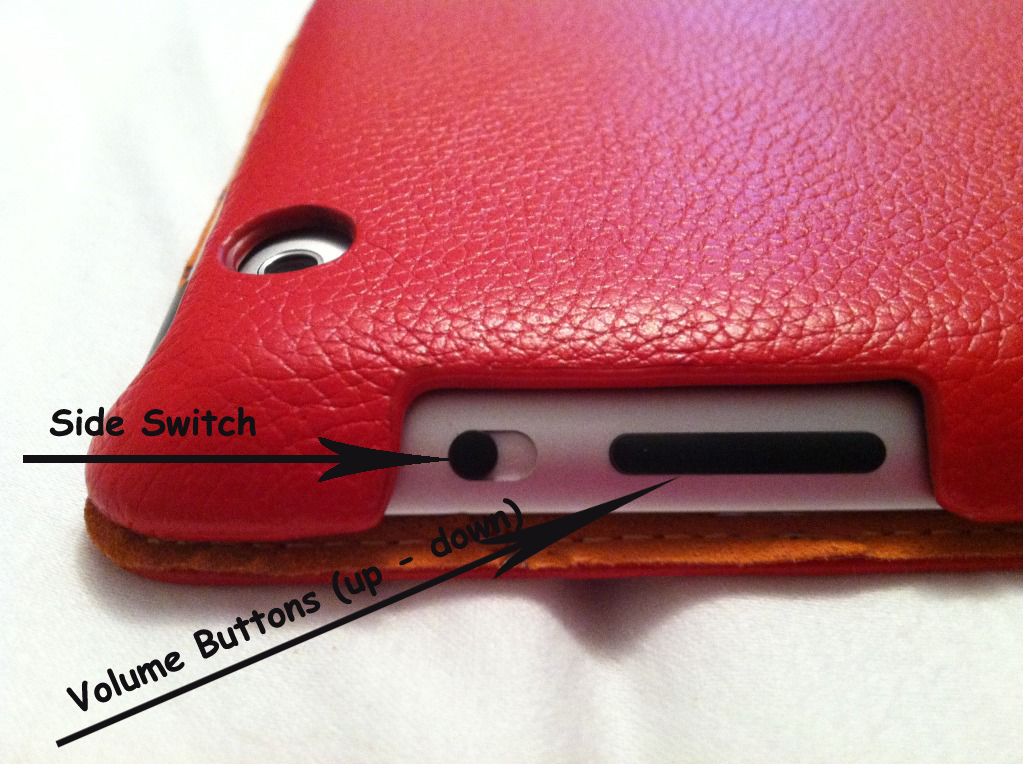
- There seem to be certain apps, or combination of apps, that disable sound. Try doing a system re-set. Press the Home button and the on-off button on top of the iPad at the same time and hold until you see the Apple logo appear. DISREGARD any interim screens that appear, including the welcome screen, and just wait until the apple logo appears. This will “re-set” the iPad, but no data or settings will be lost. This should restore sound.
- You may be able to hear audio playback, such as music, podcasts, movies, and TV shows but NOT notifications, sound effects and some apps. The SIDE SWITCH might be set to SILENT. The solution is to un-mute the SIDE SWITCH button.
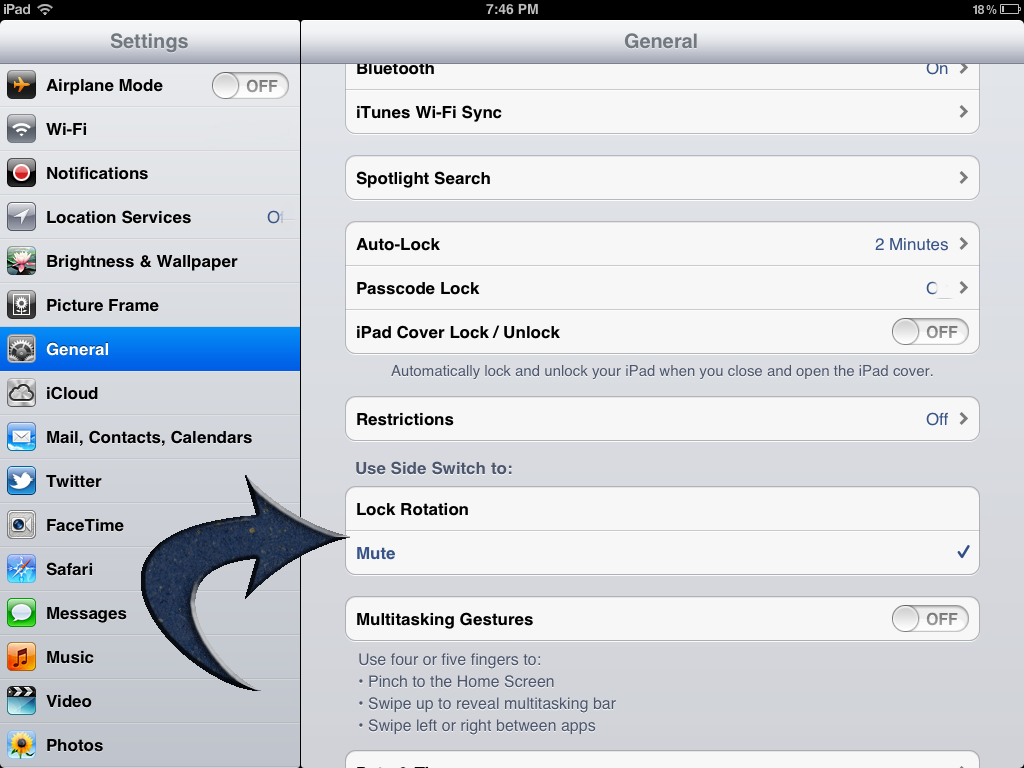
- It may happen that you do not get sound even after moving the SIDE SWITCH button that is because in the mean time you have the SLIDE SWITCH set to control rotation lock. To turn it back to being SOUND control again go to Settings, to General > Use Side Switch to, then tap Mute. After you have done this, open the app you wish to play and switch SLIDE SWITCH to un-mute.
In case you ran into difficulties with sound on your iPad, you might have read the following suggestions in Apple’s iPad 2 Manual:
Tuesday, February 7, 2012
iPad 2 Sound Issue When Buttons Do Not Help - Quick Fix
It may happen that you do not get sound even after moving the SIDE SWITCH button. That is because in the mean time you have the SLIDE SWITCH set to control rotation lock. To turn it back to being SOUND control again go to Settings, to General Use Side Switch to, then tap Mute. After you have done this, open the app you wish to play and switch SLIDE SWITCH to un-mute.
If this does not help, try doing a system re-set. there seem to be certain apps, or combination of apps, that disable sound.
Press the Home button and the on-off button on top of the iPad at the same time and hold until you see the Apple logo appear. DISREGARD any interim screens that appear, including the welcome screen, and just wait until the apple logo appears. This will “re-set” the iPad, but no data or settings will be lost. This should restore sound.
For more information go to www.atreks.com
iPad 2 Sound Issue - Quick Fix
The most common reasons why people cannot hear some applications, but they can listen to a TV show, movie, music or a podcast.
You may be able to hear audio playback, such as music, podcasts, movies, and TV shows but NOT notifications, sound effects and some apps. The SIDE SWITCH might be set to SILENT. The solution is to un-mute the SIDE SWITCH button.
For more information go to www.atreks.com
Tuesday, January 10, 2012
Explore Math And Solar System
 |
| Arithmetic Invaders Grade 2 |
* Two addition games
* Two subtraction down games
* Two multiplication games
* Two division games
* Basic facts about the Solar System
* Focus on Math problems to avoid random shoot-out
* Complete missions to move to the next level and earn space pilot ranks
* Collect insignia
* Apply fine motor skills and hand-eye coordination
Thursday, January 5, 2012
welcome to their world apps: @Reks apps
welcome to their world apps: @Reks apps: @Reks has a lot of really awesome learning apps. All their apps can really help our children get into spelling and math in a cute and friend...
Friday, December 23, 2011
Technology in (SPL) Education | Build A Word Express - Practice spelling and learn letter sounds and names
Technology in (SPL) Education | Build A Word Express - Practice spelling and learn letter sounds and names
http://itunes.apple.com/us/app/build-a-word-express-practice/id445774924?mt=8&ls=1
Enjoy FREE App of the Day featured by Technology in Education.
Check out this application on the App Store:
 | Build A Word Express - Practice spelling and learn letter sounds and names@Reks Category: Education Updated: Dec 22, 2011 |


Thursday, December 8, 2011
Thursday, November 24, 2011
AppyThanksgiving and AppyBlackFriday App SALE
Check out Technology in (SPL) Education #AppyBlackFriday SALE Page: http://techinspecialed.com/appythanksgiving/index.php?s=md
They offer an enormous list of apps that are either FREE or on SALE this week!

They offer an enormous list of apps that are either FREE or on SALE this week!

Monday, November 21, 2011
Technology in (spl) Education - Build A Word - Easy Spelling with Phonics
Technology in (spl) Education - Build A Word - Easy Spelling with Phonics
Come and get it! Promo code giveaway!!!
Technology in (spl) Education - Build A Word - Easy Spelling - Learn to Spell Sight Words, Long Vowel and Short Vowel Words
Technology in (spl) Education - Build A Word - Easy Spelling - Learn to Spell Sight Words, Long Vowel and Short Vowel Words
Build A Word - Easy Spelling - Learn to Spell Sight Words, Long Vowel and Short Vowel Words
Description: Create multiple lists of spelling words in addition to 600 existing words. Children are motivated through positive reinforcement.
Appy Thanksgiving App Sale Event!
Appy Thanksgiving App Sale Event!
Appy Thanksgiving is an event organized by Technology (SPL) Education. They will be offering tons of apps. Join the discussion on their Facebook Event Page for a chance to win great free prizes! The prizes will include apps, gift cards and more!
Check out which apps will be offered at http://techinspecialed.com/appythanksgiving/.
You may also show your appreciation to each participating developer by liking their Facebook Page or Following them on Twitter by going to this THANK YOU Page: http://techinspecialed.com/appythanksgiving/developers.php.
Gobble up incredible app deals. Go to Technology in Education FB Page to grab a promo code and more ... !!!!

Friday, October 28, 2011
@Reks turns one! Caboose GIVEAWAY! - Educational Apps For Kids
Smart Apps For Kids is helping @Reks celebrate the FIRST anniversary!!!


Tuesday, October 25, 2011
Memory Game: Spelling Words - Educational Apps For Kids
Memory Game: Spelling Words - Educational Apps For Kids
Smart Apps for Kids reviewed Memory Game Spelling Words, educational application for iPhone, iPad and iPod Touch. Here are the highlights of the review:
Memory Game: Spelling Words makes learning sight words more enjoyable than simple flash cards through a matching game and bridge-diving dinosaurs. Children simply match two alike words to eliminate those two tabs, partly revealing an image behind.
...
The atmosphere created by developer @Reks is excellent. There is nice background music, great sound, the children's voices in the mini-game, and really cute animated dinosaurs. I think the app would also work very well with special needs children who, in my experience with my oldest son, definitely prefer this type of atmosphere.
...
That said, it's a really well-done app at a great price. Recommended!
Read more ...
Sunday, October 23, 2011
Caboose - Learn to Recognize and Complete Patterns (2.0)
Caboose helps your child acquire analytical and logical thinking with the following features:
** Pattern content: shapes, colors, letters (upper/lower case), numbers, mix of any previous patterns (colors and shapes, numbers and letters, shapes and numbers...);
** Pattern type(s): ABAB, AABA, AABB, ABC...;
** Narration for each pattern item;
** Choice of narration with names of the letters or sounds of the letters (phonics) for letters;
** Option to drag-and-drop or tap the correct item to continue the pattern.
Pattern recognition and completion represent an important developmental skill for preschool children by expanding their intelligence quotient (IQ). It is a cognitive exercise for your child's brain. Caboose requires the child to compare concepts and recognize patterns. The process of comparing helps the child prepare for learning to recognize shapes, colors, numbers, etc.
Though all children develop as individuals, the age ration below should provide parents as a starting point in helping their children's performance:
- Ages 4-5: Can complete without assistance.
- Age 3: Can complete with minimal assistance after directions are given.
- Age 2: Introduction to math concepts -- can complete with adult assistance
Download it from iTunes by clocking here: Caboose - Learn to Recognize and Complete Patterns
Sunday, October 16, 2011
Help Your Child Build Cognitive Skills
 San Diego, March 29, 2011 - @Reks announces the release of Memory Game Spelling Words Application, an educational game for children designed to encourage higher level thinking and reasoning in a fun and friendly atmosphere. This iPhone, iPad, and iPod Touch application is yet another one in a series of successful educational apps designed by professionals in the field of education. @Reks’ apps are ... Read More
Thursday, October 13, 2011
Latest iOS5 - A Step Forward or Backward?
If you have had problems installing UPDATE on your iPhone / iPad, this might help you.
Though iOS 5 is not as drastic of an upgrade as we saw with iOS 4 in June 2010, it does offer some much-needed and exciting enhancements for iOS users. A few are quiet and long overdue and others will seriously change how you use your Apple handset.
A few improvements simply make the user experience easier, like Twitter integration in the major Apple apps, basic image-editing tools for the camera, and a Notification system paired with reminders that keep you informed with a glance at your Home screen.
Available for free, iOS 5 will be compatible with the iPhone 4S, the iPhone 4, the iPhone 3GS, both versions of the iPad, and the third- and fourth-generation models of the iPod Touch. Keep in mind that the quality of iOS 5 may vary by device. When Apple released iOS 4 last year, many iPhone 3G users complained of degraded device performance after they downloaded the update (one group even filed a lawsuit).
Instead of pop-up menus that interrupt your work, a new Notification Center will combine messages, missed calls, app updates, a stock ticker, and the current weather in a single place. You can access it by swiping your finger downward from the top of the screen, and notifications will appear on the lock screen as well. You then can jump directly to the related feature for each notification and delete items by tapping the small X next to each line.
The mobile version of Apple's Web browser now has the Reader option that was announced at the 2010 WWDC. Rather than having to deal with complicated layouts of various Web sites, the reader streamlines multipage articles in a RSS-like view while stripping out ads, but leaving photos. You also can e-mail the entire text of a Safari page to a contact (under iOS 4, you could send only a link).
In other Safari news, tabbed browsing is now available on the iPad and you can add a Web page to a Reading List list for future perusal on any iOS device. The latter feature keeps a story on your reading list until you have time to read it, and it can be synced between multiple Safari devices.
This handy addition lets you store multiple to-do lists with dates for each event; you can categorize reminders by GPS location. So, for example, if you have a reminder of "Call home when I leave work," the app will use GPS to note when you're on the move and send the reminder via push notification. Reminders can be shared between devices and sync with iCal on the Mac with CalDAV, and on Windows with MS Exchange. The app has its own sleek-looking scrollable calendar as well, so you can browse or add new tasks and reminders for future dates.
iOS 5 adds several requested features to the camera app, making it much more like a point-and-shoot camera. You get a shortcut on the lock screen that will launch the camera immediately, even bypassing the lock code. A simple double-tap of the Home button brings up both the basic music controls (as before) and the camera icon in the lower right. You then can use the volume control to snap a photo. The picture is saved to your camera roll, but for security (having not used your access code) you'll only be able to delete the shot (keeping unwanted users from browsing your iPhone photos). Inside the camera you'll get grid lines, pinch to zoom (in addition to a slider bar at the bottom of the screen), autofocus, and the ability to change the exposure.
The iOS mail app now has rich text formatting, better indent control, flagging of messages, and the ability to drag addresses between To, CC, and BCC lines. Also, you now can search within the body of a message instead of just in the From, To, and subject lines.
Read more: http://reviews.cnet.com/8301-19512_7-20118920-233/apple-ios-5-review-modest-but-definitely-worthwhile/#ixzz1ah1lFhzX
Written by Jason Parker
Though iOS 5 is not as drastic of an upgrade as we saw with iOS 4 in June 2010, it does offer some much-needed and exciting enhancements for iOS users. A few are quiet and long overdue and others will seriously change how you use your Apple handset.
A few improvements simply make the user experience easier, like Twitter integration in the major Apple apps, basic image-editing tools for the camera, and a Notification system paired with reminders that keep you informed with a glance at your Home screen.
Available for free, iOS 5 will be compatible with the iPhone 4S, the iPhone 4, the iPhone 3GS, both versions of the iPad, and the third- and fourth-generation models of the iPod Touch. Keep in mind that the quality of iOS 5 may vary by device. When Apple released iOS 4 last year, many iPhone 3G users complained of degraded device performance after they downloaded the update (one group even filed a lawsuit).
Instead of pop-up menus that interrupt your work, a new Notification Center will combine messages, missed calls, app updates, a stock ticker, and the current weather in a single place. You can access it by swiping your finger downward from the top of the screen, and notifications will appear on the lock screen as well. You then can jump directly to the related feature for each notification and delete items by tapping the small X next to each line.
The mobile version of Apple's Web browser now has the Reader option that was announced at the 2010 WWDC. Rather than having to deal with complicated layouts of various Web sites, the reader streamlines multipage articles in a RSS-like view while stripping out ads, but leaving photos. You also can e-mail the entire text of a Safari page to a contact (under iOS 4, you could send only a link).
In other Safari news, tabbed browsing is now available on the iPad and you can add a Web page to a Reading List list for future perusal on any iOS device. The latter feature keeps a story on your reading list until you have time to read it, and it can be synced between multiple Safari devices.
This handy addition lets you store multiple to-do lists with dates for each event; you can categorize reminders by GPS location. So, for example, if you have a reminder of "Call home when I leave work," the app will use GPS to note when you're on the move and send the reminder via push notification. Reminders can be shared between devices and sync with iCal on the Mac with CalDAV, and on Windows with MS Exchange. The app has its own sleek-looking scrollable calendar as well, so you can browse or add new tasks and reminders for future dates.
iOS 5 adds several requested features to the camera app, making it much more like a point-and-shoot camera. You get a shortcut on the lock screen that will launch the camera immediately, even bypassing the lock code. A simple double-tap of the Home button brings up both the basic music controls (as before) and the camera icon in the lower right. You then can use the volume control to snap a photo. The picture is saved to your camera roll, but for security (having not used your access code) you'll only be able to delete the shot (keeping unwanted users from browsing your iPhone photos). Inside the camera you'll get grid lines, pinch to zoom (in addition to a slider bar at the bottom of the screen), autofocus, and the ability to change the exposure.
The iOS mail app now has rich text formatting, better indent control, flagging of messages, and the ability to drag addresses between To, CC, and BCC lines. Also, you now can search within the body of a message instead of just in the From, To, and subject lines.
Read more: http://reviews.cnet.com/8301-19512_7-20118920-233/apple-ios-5-review-modest-but-definitely-worthwhile/#ixzz1ah1lFhzX
Written by Jason Parker
Jason Parker writes software reviews and features for Windows, Mac, and iPhone and has been with CNET for more than a decade. His primary focus is staying on top of iOS and Mac software releases while at work as a senior associate editor, but in his downtime enjoys seeking out the best breakfast spots in the Bay Area.
Tuesday, October 11, 2011
Smart Apps Open House this Saturday! One day only! - Educational Apps For Kids
Smart Apps Open House this Saturday! One day only! - Educational Apps For Kids
Go to Smart Apps for Kids Facebook Page to get PROMO CODES for your favorite apps! Open House this Saturday, October 15th!
One day only!!!
Smartappsforkids.com has a huge and growing number of Facebook followers (3,098 at the time of this post) and a very long list of apps waiting to be reviewed, so this is a chance for everyone to get together and say hello.
If this works well, we'll do it on a regular basis.
Monday, October 10, 2011
Memory Game Spelling Words 2.0
Currently there are three word lists of 600 words to choose from PLUS option to create a custom list of spelling words!
Single player / two player mode
Subscribe to:
Posts (Atom)